
In this blog post we describe how the MING stack, extended with Edge Impulse, can accelerate the development of IoT and Edge AI applications. By combining open-source building blocks with on-device machine learning, developers can start prototyping without reinventing the same infrastructure over and over again. Here's how it came about, and how to implement it yourself.
A few weeks ago, while working on a computer vision application, I found myself facing an engineering dilemma. I had a camera attached to an Arduino UNO Q (embedded Linux device), an Edge Impulse model ready to run inference, and a clear idea of the outcome I wanted: detect objects at the edge, store the results, visualize trends, and trigger events. My engineer’s instinct was to start wiring everything together manually: a custom API, a database schema, a frontend dashboard, and some glue code to hold it all together.
Instead, I took a step back and followed the same philosophy that originally inspired the MING stack (MQTT, Influx, Node-RED and Grafana). Rather than building everything from scratch, why not reuse this set of well-known, open-source tools that already solve most of these problems?
I still remember in the late 90s when the first web developers were learning to build websites, the LAMP stack came to the rescue of many new developers who wanted to get started into Web development.
The success of the LAMP stack (Linux, Apache, MySQL, and PHP or Python) came from standardization. Developers knew that if they learned Linux, Apache, MySQL, and PHP, they could build almost any web application. At that time, the LAMP stack reduced the friction to deploy a basic web server in your local computer to start building your own web application without reinventing the wheel.
How does MING help IoT and Edge AI developers?
Most IoT and Edge AI applications share the same core requirements:
- Reliable messaging between components
- Persistent storage for time-series data
- Flexible logic to process and enrich data
- Dashboards and visual tools for insight and monitoring
By standardizing these layers with MQTT, InfluxDB, Node-RED, and Grafana, the MING stack removes friction and allows teams to iterate quickly. Adding Edge Impulse to this stack extends the concept to enable edge AI.
In this architecture, each service runs in its own Docker container and communicates over a shared network. The stack can run on an industrial PC, or an edge device such as an embedded Linux device.
The core components are:
- Mosquitto as the MQTT broker for event-driven communication
- InfluxDB as the time-series database
- Node-RED as the no-code interface to build the applications
- Grafana as the visualization and monitoring interface
- Edge Impulse as the local inference service for Edge AI models
Deploying the MING + Edge Impulse Stack
The MING stack can be deployed on any Linux machine using Docker.
Prerequisites
Hardware
- Any embedded Linux device such as Arduino UNO Q or Raspberry Pi
- USB camera
Software
- Docker and Docker Compose
- Git
- An Edge Impulse project with a trained model. Create a free account at Edge Impulse to train your own models
Deploy the MING Stack with Edge Impulse
I used the Arduino UNO Q for this project. SSH into the Arduino UNO Q Linux; find more technical information here.
Next, clone this repository containing the Docker Compose configuration of the MING stack:
git clone https://github.com/mpous/ming-edge-impulse
cd ming-edge-impulse
Train your Machine Learning model in Edge Impulse
Go to the Edge Impulse Studio, train your object detection model (or another type) and deploy it as a Docker container.
(If you are a beginner, learn how to train a machine learning model with Edge Impulse.)
In this project, feel free to use this Object Detection public project to detect Rubber Ducks.
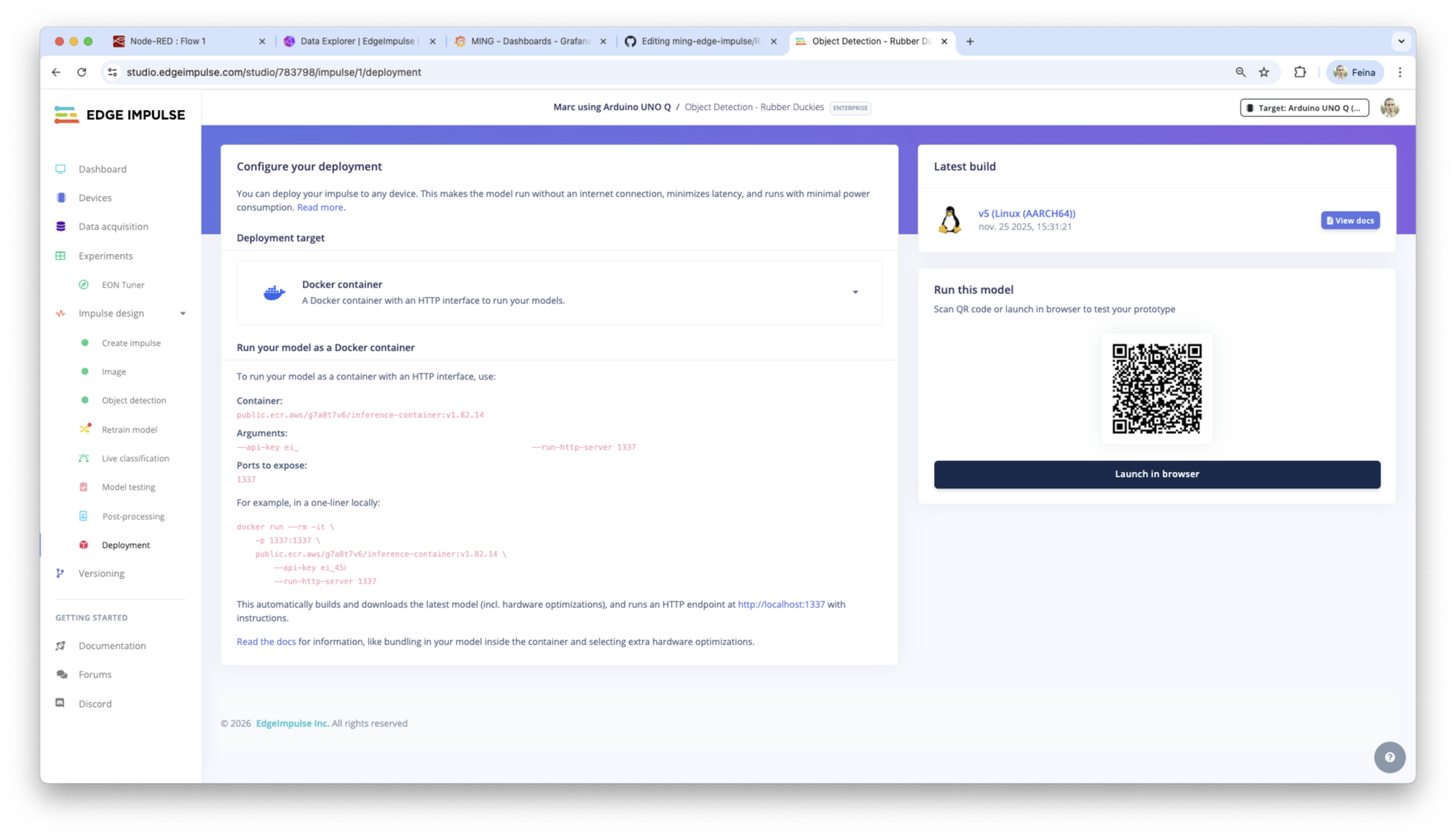
Copy the arguments and container information. Go to the edgeimpulse folder and modify the Dockerfile template pasting the API key and docker container from the Edge Impulse Studio Deployment section.
Once the Dockerfile template from edgeimpulse folder has been updated, you are ready to start all services:
docker compose up -dOnce running, the services will be available at:
- Node-RED on port 80
- InfluxDB on port 8086
- Grafana on port 8080
- Edge Impulse inference API on port 1337
- Mosquitto MQTT broker on port 1883
You should be able to access from your computer using the local IP address of the embedded Linux device that you are using, if you are connected to the same network. You also can use the name of the services internally to route call the services.
Configuring Node-RED
Open a browser on your computer connected to the same network than the Arduino UNO Q and navigate to:
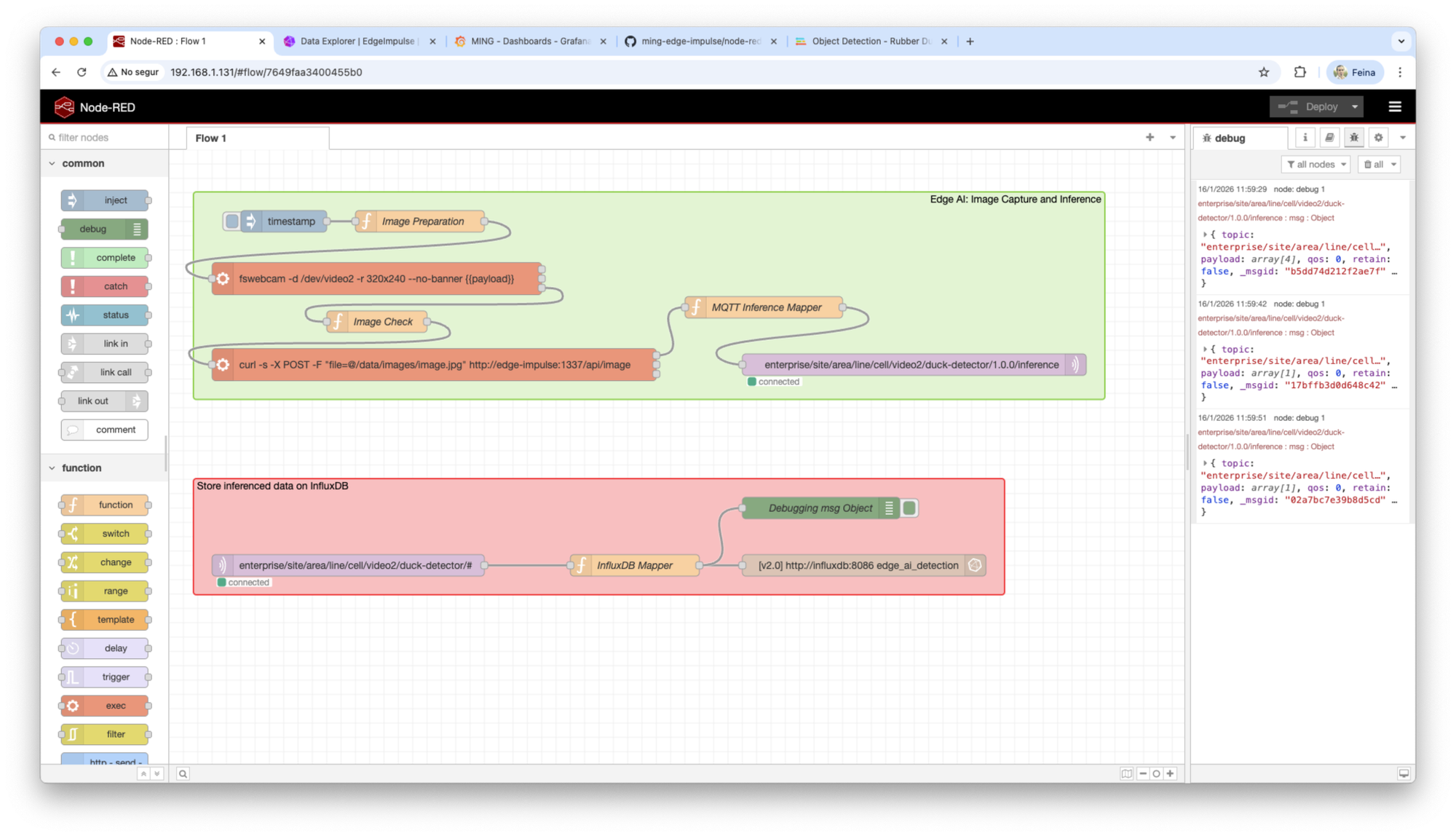
http://<arduino-device-ip>In the Node-RED UI, import the provided flows in the `node-red` folder in the file `flow.json`. You should see a flow similar to this.
Setup your InfluxDB database
Now it’s the moment to set up the InfluxDB database.
InfluxDB is the time-series database used in the MING stack to store inference results and metadata produced by the Edge AI pipeline. In this project we use InfluxDB v2.8.0 (the latest version).
Create the initial InfluxDB account
Once the MING stack is running, open a browser on your computer connected to the same network than the Arduino UNO Q and navigate to:
http://<arduino-device-ip>:8086On first access, InfluxDB will prompt you to complete the initial setup:
- Create an admin user by providing a
usernameandpassword - Define an organization name (for example:
edge-impulse) - Create an initial bucket (for example:
edge-impulse-detections)
After completing these steps, InfluxDB will initialize the database and redirect you to the InfluxDB UI.
Create an API token
InfluxDB v2 uses API tokens instead of username/password authentication for clients.
To create a token:
- In the InfluxDB UI, go to
Load Data→API Tokens - Click
Generate API Tokenand chooseAll Access API Tokenfor development (this is only for testing purposes) - Copy and store the token
This token will be required by Node-RED to write inference data into InfluxDB.
Edit the influxdb node
Configure the InfluxDB Out node in Node-RED and paste the token.
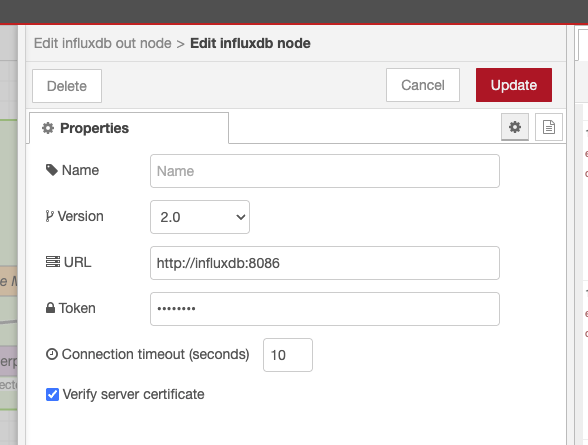
Once configured, the InfluxDB Out node is ready to receive structured data points from Node-RED.
The MING + Edge Impulse workflow
With this workflow, you will be able to:
- Capture images from the USB camera (check if your camera is on
/dev/video0,/dev/video1or/dev/video2).


- Send images to the Edge Impulse inference service in
http://edge-impulse:1337 - Parse inference results
- Publish results to the MQTT broker in
http://mosquitto:1883
(In this project I’m using a topic inspired by the Unified Namespace concept.) - Subscribe to the MQTT broker to receive inference results
- Map the inference results to the InfluxDB payload
- Store inference results in InfluxDB
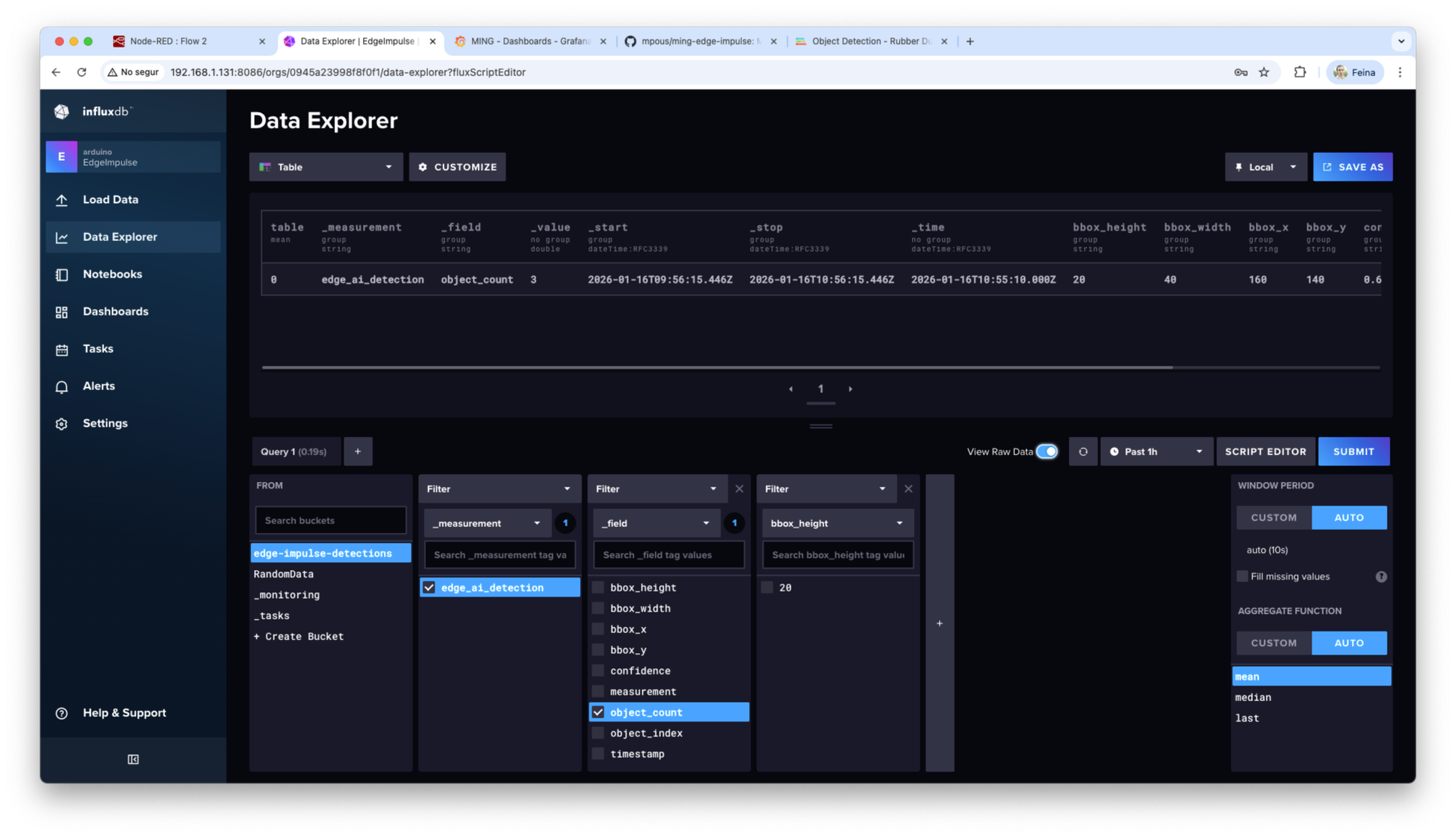
Once this workflow works, go to the InfluxDB UI to check that the data is being stored successfully.
Why do we use MQTT?
MQTT plays a central role in the MING stack because it allows us to decouple edge AI inference from data storage or any other process that needs to act on the inference data.
Inference results are published to an MQTT broker instead of being written directly to a database. This ensures that the inference pipeline remains lightweight, modular, and independent of any specific storage or analytics technology.
By using MQTT as the integration layer, multiple consumers can subscribe to the same inference stream and handle the data according to their needs. One subscriber might store detections in InfluxDB, another could trigger alerts, while a third could forward results to a cloud service or an MES or SCADA industrial system. None of these consumers need to be known or configured at inference time.
Visualizing Results in Grafana
Grafana connects directly to InfluxDB as a data source. Using Flux queries, dashboards can display:
- Total detections per time window
- Detections per label
- Confidence trends
- Detection rates per camera
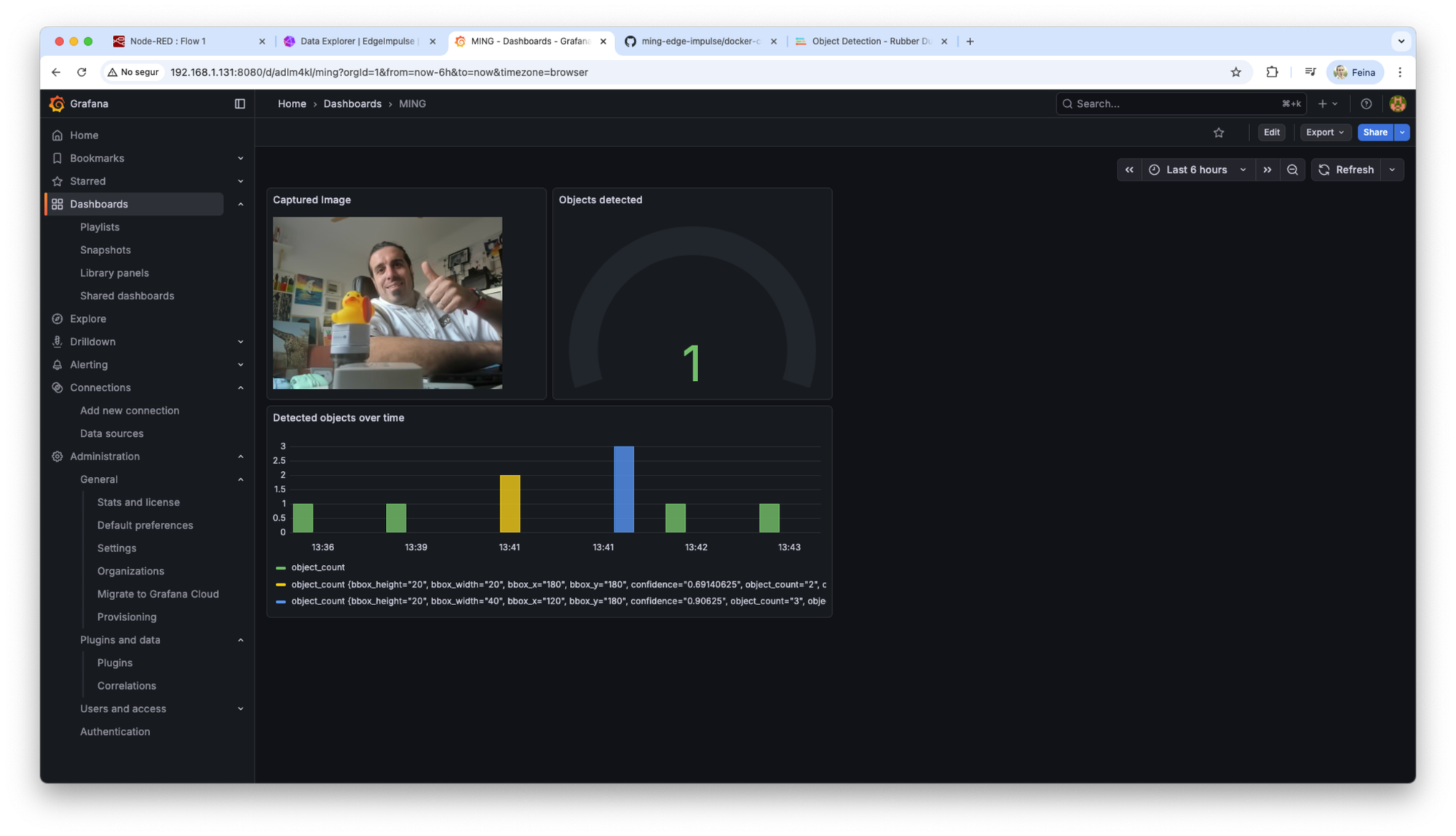
I added the Grafana dashboard configuration in a JSON file in the Github repository, inside the node-red folder. Feel free to use import it, in order to have an initial simple dashboard.
What can you do with the MING Stack and Edge Impulse?
This architecture enables developers to build a wide range of edge AI prototypes in a really easy way. Find here some examples of applications already working on production using the MING stack:
- Object detection analytics
- Manufacturing quality inspection
- Logistics and warehouse object counting
- Privacy-preserving video analytics at the edge
- Trigger multiple services depending on the inference results
Because the stack is modular, components can be replaced or extended without redesigning the entire system.
If you are interested in Edge AI, IoT, and open architectures, the MING + Edge Impulse stack provides a solid foundation to start building today. Sign up for your free Edge Impulse account to test it out and get started today.